How to generate a payroll lot ?
Most of the time, payrolls are processed in lots for all company employees.
To generate a payroll lot, proceed as follows:
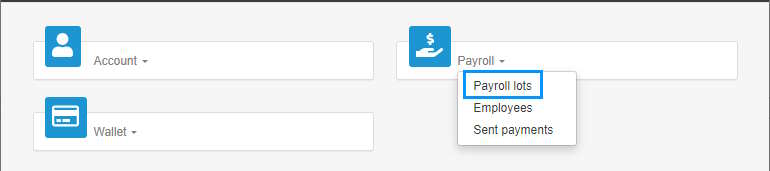
- Access the ACCEO Transphere homepage.
- Click Payroll and select Payroll lots.
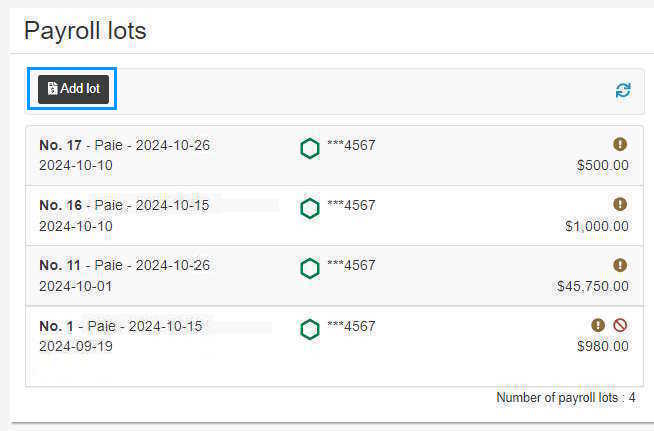
- In the Payroll lots page, click the Add lot button.
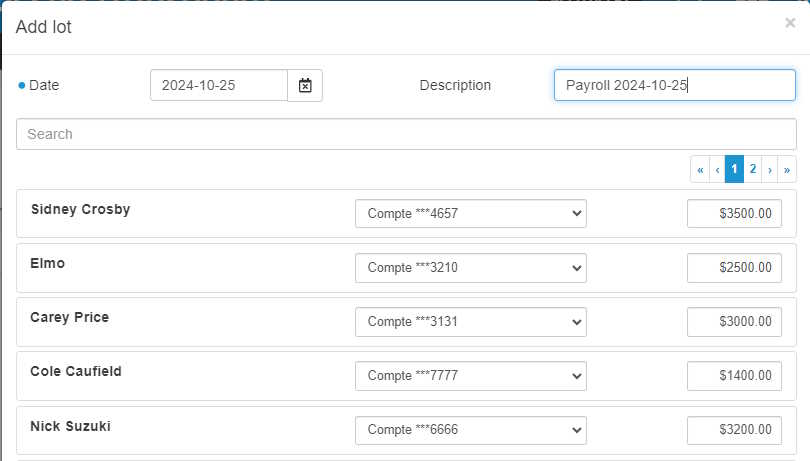
- Enter the Date of the payment. Note: Allow for 48 hours between the lot submission date and the expected pay date.
- Enter a short Description of the payroll lot so that it is easy to differentiate from the other lots. If no description is entered, the system displays the payroll deposit date by default (Payroll YYYY-MM-DD).
- The list below displays all company employees. For each employee, enter the net amount to pay in their bank account.
- If an employee has more than one bank account, the account can be changed, if required, by clicking the arrow.
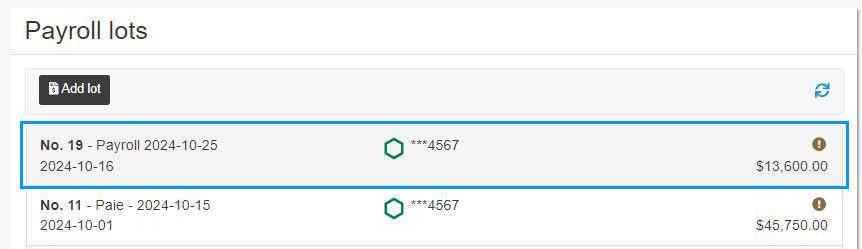
- Once the amounts are entered, click the Add button at the bottom of the page. A message indicates that the transactions were successfully added.
- In the Payroll lots
 Glide the cursor over this icon to display the number of payrolls waiting to be submitted in the lot.
 Glide the cursor over this icon to display the number of payrolls cancelled in the lot.