How to send transactions to financial institutions ?
Transactions are sent to financial institutions twice a day, at 1:00 p.m. and 6:00 p.m. on working days.
In a day, transactions entered before 1:00 p.m. are sent to financial institutions at 1:00 p.m. Transactions entered between 1:00 p.m. and 6:00 p.m. are sent at 6:00 p.m. Transactions entered
after 6:00 p.m. are sent the next day.
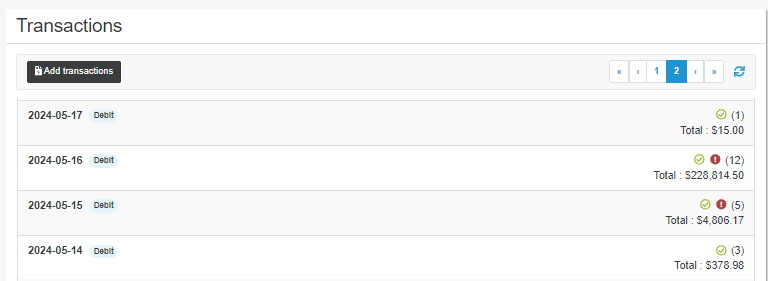
 This button displays the list of confirmed transactions, i.e. transactions which have been sent and then processed by financial institutions.
 This button displays the list of cancelled transactions.
 This button displays the list of transactions rejected for non-sufficient funds,
invalid account number, frozen account, etc.
In the list of transactions, click the line of a batch to view the detail of the transactions included in the batch.
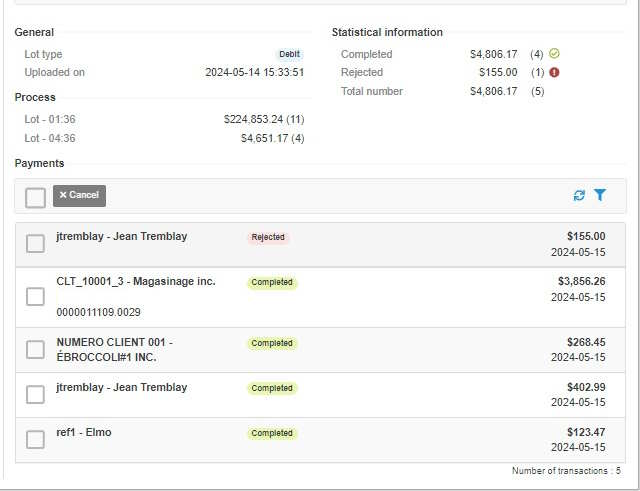
- General: Indicates the type of batch (e.g. Debit) and the date and time it was uploaded.
- Statistical information: Displays the total number of transactions and the number of confirmed, cancelled and rejected transactions.
- Processing: Indicates the time and amount of each batch sent during the day.
- Payments: Displays the detail of the transactions included in the batch.
| Status | Description |
|---|---|
| Waiting to be submitted | The transaction has been created in ACCEO Transphere, but it has not yet been submitted to be sent to financial institutions. |
| Submitted | The transaction is now submitted and ready to be sent to the financial institution.
It will be sent to the financial institution at the appropriate time. For a pre-authorized debit (PAD), the transaction is sent on the date specified for the debit (or the next working day). For a payroll, the transmission is made 48 working hours before the pay is deposited. |
| Cancelled | The transaction has been cancelled by a user. It will never be processed. |
| Rejected | The financial institution returned the transaction with an error code. The money will not be deposited or will be retrieved from the company’s bank account. |
| Mistaken | An error, usually technical, prevents the transaction from being processed. |
| Confirmed | The financial institution confirms reception of the transaction, and the funds will be transferred. Note: for payroll, this status does not apply. |